The platform
How Formation Prevention works.
How you set up prevention in your company, what your employees see, and the 12 modules you choose from.
How it works
From subscription to follow-up, in five steps.
A browser on a computer is all you need, for you and your employees alike. Setting up takes less than a morning.
- 1
You create your account, for free
YouCreate your company's account in a few minutes, at no cost: you become its administrator. You then buy online the employee accounts you need. Payment is by card, at the time of order, for 12 months.
- 2
You create your employees' accounts
YouAdd them one by one, or import the whole list at once from a CSV file. Each person automatically receives their access by email. You never see their passwords.
- 3
You choose the modules that matter
YouChoose the modules that are relevant to your business, for the whole company or for certain people, with a due date. The employees concerned are notified by email. The other modules remain freely available.
- 4
Your employees take their modules
Your employeesEach module takes about 10 minutes: a little reading, a few exercises, then a simulation. It is passed with a score of 70% or more, and the test can be retaken as many times as needed.
- 5
You follow up and send reminders
YouThe dashboard shows the completion rate, the average score and, for each employee, the modules completed, in progress or overdue, and can be downloaded as a PDF report or a CSV table, with a PDF certificate for each trained employee. Reminders go out automatically, 3 days before the due date and then every week if overdue (you can turn them off), and you receive a summary on the 1st of each month.
The platform
What you will see, and what your employees will see.
Screenshots of the real platform, with a fictitious company and employees.
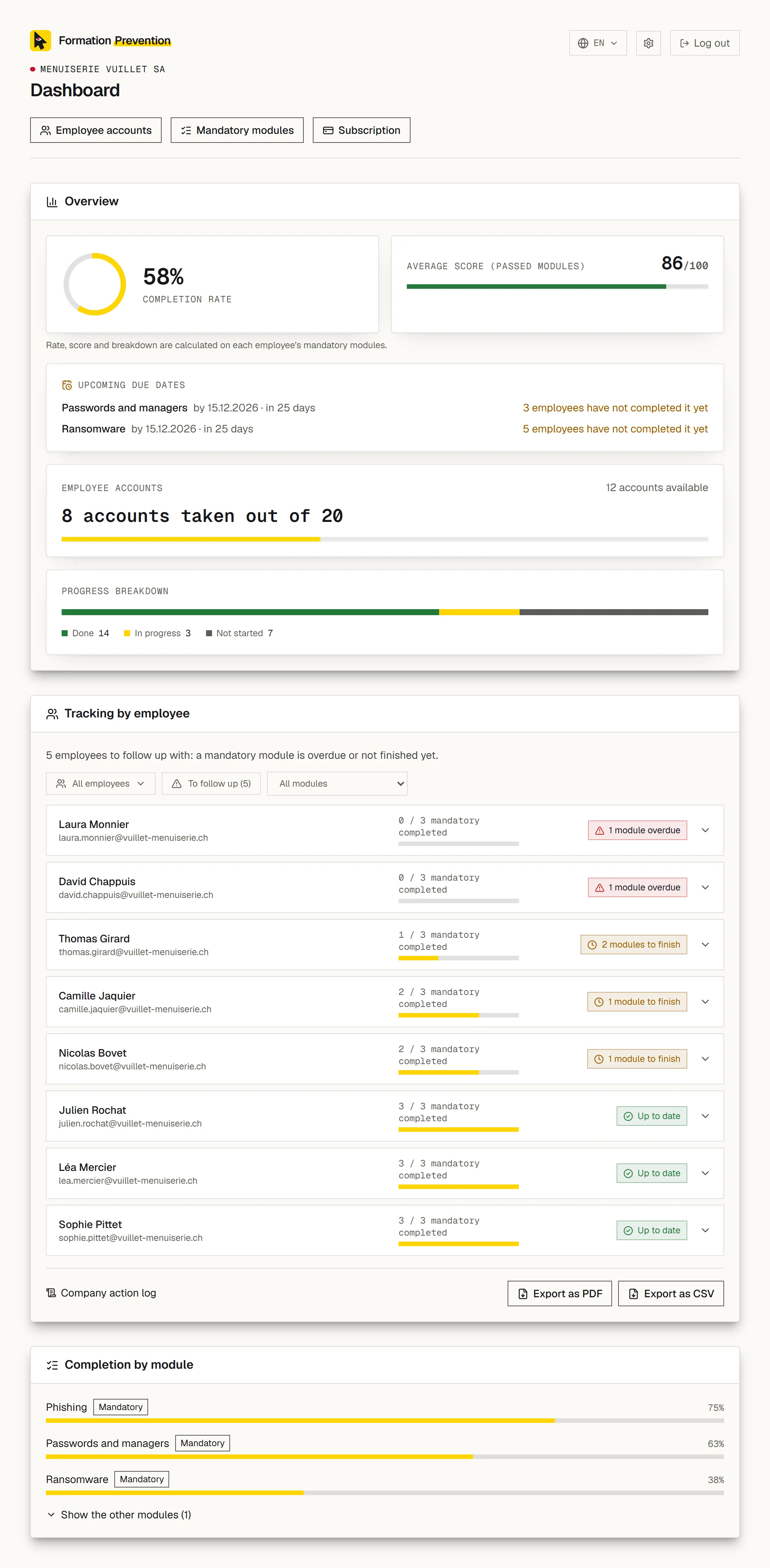
Your dashboard
The completion rate, the average score, the upcoming deadlines and, for each employee, the modules completed, overdue or in progress, with the part reached. The people to remind appear first, and everything can be downloaded as a PDF report or a CSV table, with a certificate for each trained employee.
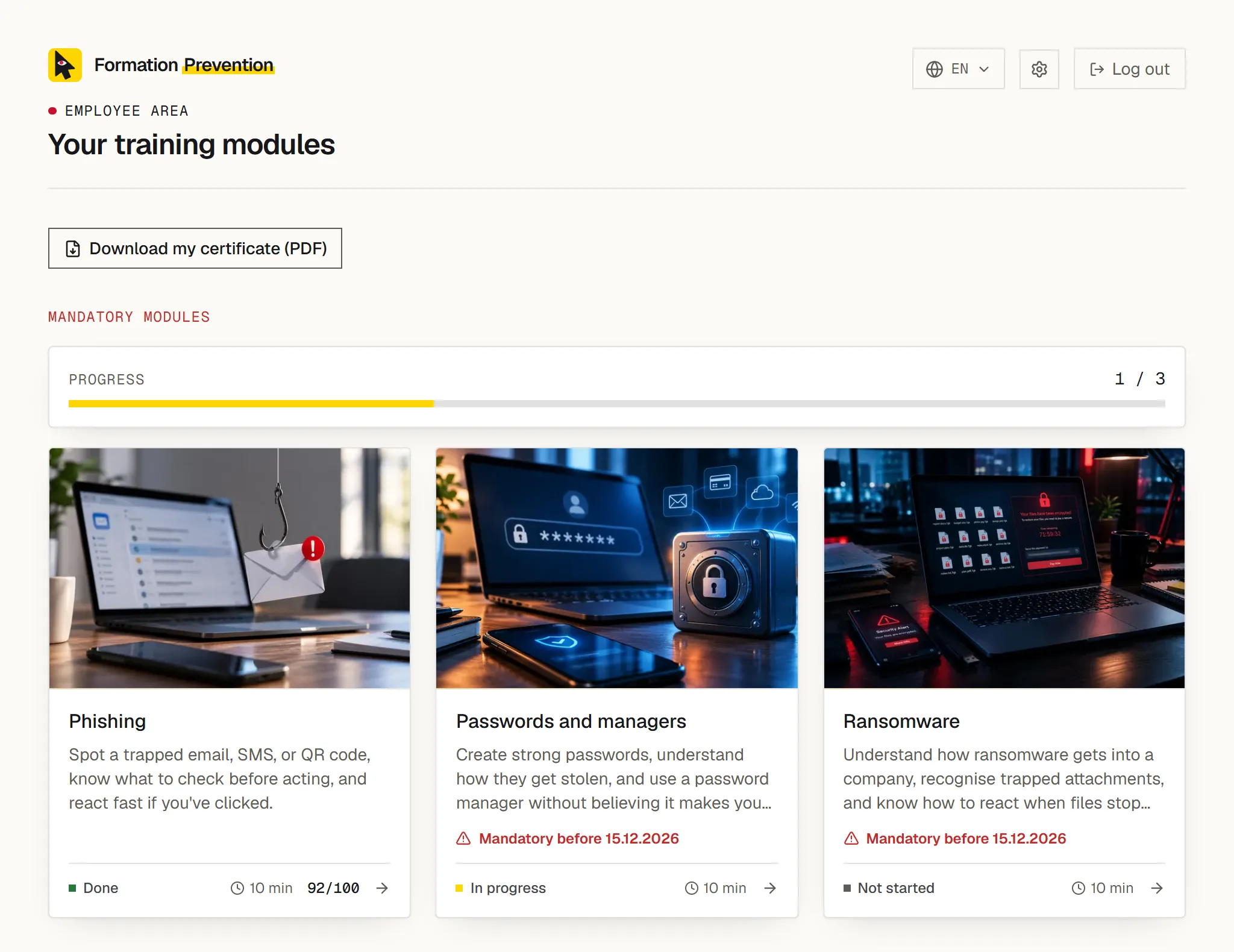
Your employees' space
Everyone finds their mandatory modules first, with the duration, progress and the module score.
The modules
Twelve topics, about 10 minutes each.
Approximate duration per module. Choose the ones that matter to your company: there's no need to take them all.
- Phishing, 10 minutes
- Identity fraud, 10 minutes
- Passwords and managers, 10 minutes
- Secure web browsing, 10 minutes
- Public Wi-Fi, 10 minutes
- Two-factor authentication (MFA), 10 minutes
- Ransomware, 10 minutes
- USB drives and external media, 10 minutes
- Remote work and home networks, 10 minutes
- Deepfake and vishing, 10 minutes
- Backups and sensitive files, 10 minutes
- Incident reporting, 10 minutes
Demo accounts: step by step
You can test the platform without buying any employee accounts. Here are the steps.
- 1
Create your administrator account
On the sign-up page, enter your company name and your email address. Confirm your address with the link we send you: your account is then validated. You also receive the brochure “Good habits”.
- 2
Open Employee accounts
From the dashboard, click “Employee accounts”: this is where you manage accounts and demo accounts.
- 3
Create a demo account
In the “Demo accounts” card, enter a person's name and email address. They receive a temporary password by email. You can create up to three at a time, and no more than ten per year; deleting a demo account frees its slot.
- 4
Or try it yourself
Click “Try the module myself”: you open the Phishing module with your own account, without creating another one.
- 5
Do the module once
The Phishing module can be done once, within 30 days of the demo account being activated (when it is created, or when you click “Try the module myself”). After that, it is no longer accessible.
Demo accounts use no employee account and are not billed.
Frequently asked questions
What we are often asked.
Setup and follow-up
How much time does an employee need?
About 10 minutes per module, in an ordinary browser: nothing to install. A module can be interrupted and resumed later where it was left off, even from another computer.
Can the modules be taken on a phone or tablet?
The modules are taken on a computer, and that is deliberate: the simulations reproduce your employees' workstation (inbox, browser, desktop), and they need a computer screen to be realistic. This website, however, can be viewed on any device.
Can the administrator also take the modules?
Yes. From their settings, the administrator can enable access to the modules to take them too, like their employees. They are then counted as an employee in your plan.
What if our administrator is away or leaves the company?
The administrator can appoint a deputy among your employees: your company can have two administrators. The deputy keeps access to the modules and costs no additional account. If the former administrator has not logged in for 14 days, the deputy can remove their rights, without having to contact us.
What happens if an employee leaves the company?
The administrator replaces their account with the account of the person taking over, from “Employee accounts”: the new employee takes over the place on the same subscription, with no extra purchase. The departing person's account is deleted, along with their progress. To prevent abuse, the number of replacements is limited each year.
Can we prove that our employees have taken the modules?
Yes. From the dashboard, the administrator can download a dated PDF report at any time: completion rate, mandatory modules and deadlines, and for each employee the modules passed, with their score and date. They can also download a PDF training certificate for each employee, and export all results as CSV for a spreadsheet. Useful for management, an audit or an insurer.
Can we try it before buying accounts?
Yes. From your administrator space, create up to three free demo accounts, or try it yourself: each can take the Phishing module once, within 30 days of its activation. No employee account is used.
The modules
Do we have to take all 12 modules?
No. The goal is not to turn your employees into experts, but to give them the right habits for the traps they are actually likely to face. Choose the modules that matter to your company and make them mandatory for the people concerned; the others remain available to anyone who wants them.
How is a module passed?
A module is passed with a score of 70% or more, with the module's exercises and the final test counting equally. Below that, the employee sees their mistakes explained and can retake the test, with no limit on attempts.
Which languages are the modules available in?
The platform and all modules are available in French, German, Italian and English.
Do the modules stay up to date?
Yes. The modules evolve over time (new scams, changes in Swiss law): updates are included in your subscription, at no extra cost.
Why retake the modules regularly?
We recommend it: scams change and good habits fade. We suggest retaking the modules every six to twelve months. On the platform, the administrator can reassign them at any time, with a new deadline.
Pricing
From 49 CHF per account and per year, all modules and the dashboard included.
Let's talk about your company.
Request a demonstration, or create your company's account straight away.